
Cockpit Reference Guide


Garmin G1000H
™
Cockpit Reference Guide for the Bell 407GX
190-01254-00 Rev. B
27
Nav/Com/XPDR/Audio Panel
Flight
Instruments EICAS
Nav/Com/
XPDR/Audio AFCS GPS Nav
Flight
Planning Procedures
Hazard
Avoidance
Additional
Features
Abnormal
Operation
Annun/
Alerts Appendix Index
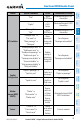
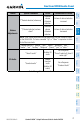
Control Spoken Command Action Confirmation of Action
Volume
Adjustments
“(*Desired selection) volume up”
Increases
volume
of desired
selection
Volume of desired selection
increased
“(*Desired selection) volume
down”
Decreases
volume
of desired
selection
Volume of desired selection
decreased
NOTE: Finer volume adjustment may be made using the dual concentric knobs
on the GMA 350H. The voice command “Up” or “Down” is equivalent to three
click of the inner knob.
* Desired selection = “speaker”, “pilot”, “copilot”, “passenger”, “pass”,
“marker”, “aux”, “auxiliary”, “telephone”, “phone”, “jack”, or “music”.
3D Audio
“Three-D audio”
Enables 3D
audio
Voice Response:
“Three-D audio left, three-D
audio right”
“Standard audio”
Enables
standard
audio
(disables 3D
audio)
Voice Response:
“Standard Audio”
Voice Recognition Commands