
Cockpit Reference Guide



Garmin G1000H
™
Cockpit Reference Guide for the Bell 407GX
190-01254-00 Rev. B
21
Nav/Com/XPDR/Audio Panel
Flight
Instruments EICAS
Nav/Com/
XPDR/Audio AFCS GPS Nav
Flight
Planning Procedures
Hazard
Avoidance
Additional
Features
Abnormal
Operation
Annun/
Alerts Appendix Index
3D Audio Troubleshooting
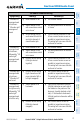
Symptom(s) Cause(s) Solution(s)
“3D audio left”
message heard
in both ears.
“3D audio right”
message not
heard
1) Mono headset in use 1) Use a stereo headset
2) Stereo headset in use
with mono/stereo switch
set to ‘mono’
2) Set mono/stereo switch on headset
to ‘stereo’
3) Aircraft wiring has left
audio wired to both left
and right channels of
stereo headset jack
3) If after checking solutions #1 and
#2 see a service center as soon as
possible to inspect/correct wiring.
This wiring fault can cause fail-safe
audio not to function.
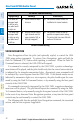
“3D audio left”
message heard
in both ears,
followed by “3D
audio right”
message heard
in both ears
1) Mono headset in use 1) Use a stereo headset
2) Stereo headset in use
with mono/stereo switch
set to mono
2) Set mono/stereo switch on headset
to ‘stereo’
3) Incorrect aircraft wiring
(left/right shorted
together)
3) If after checking solutions #1 and
#2 see a service center as soon as
possible to inspect/correct wiring.
This wiring fault can cause fail-safe
audio not to function.
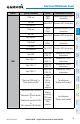
“3D audio right”
message heard
in both ears.
“3D audio left”
not heard
1) Incorrect aircraft wiring
(right channel used for
mono instead of left or
left/right swapped)
1) See a service center as soon as
possible to inspect/correct wiring.
This wiring fault can cause fail-safe
audio not to function.
“3D audio left”
message heard
in right ear only
followed by “3D
audio right”
message heard
in left ear only
1) Stereo headset is on
backwards
1) Verify correct orientation from the
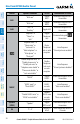
left/right indication on each side of
the headset or the position of the
boom mic (usually attached on left
side). If the headset is backwards
left/right position information will be
swapped.
2) Incorrect aircraft wiring
(left/right channels
swapped)
2) See a service center as soon as
possible to inspect/correct wiring.
This wiring fault can cause fail-safe
audio not to function.