
Cockpit Reference Guide



Garmin G1000H
™
Cockpit Reference Guide for the Bell 407GX
190-01254-00 Rev. B
19
Nav/Com/XPDR/Audio Panel
Flight
Instruments EICAS
Nav/Com/
XPDR/Audio AFCS GPS Nav
Flight
Planning Procedures
Hazard
Avoidance
Additional
Features
Abnormal
Operation
Annun/
Alerts Appendix Index
Blue-Select Mode (Telephone/Entertainment Distribution)
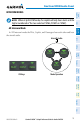
The music (MUSIC) and telephone/entertainment ( ) audio are distributed
using the Blue-Select Mode. The following example indicates that the pilot, copilot,
and passengers will all hear the telephone/entertainment audio.
Blue-Select Mode (Telephone/Entertainment Distribution)
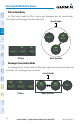
The Blue-Select Mode is entered by pressing the small knob when the the volume
control cursor (flashing green annunciator) is not active. If the voume control cursor
is active, press the small knob twice. The first press will cancel the volume control
cursor, the second will activate Blue-Select Mode.
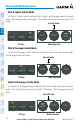
The annunciator over the Button will be flashing blue. Any combination of
the annunciators over the PILOT, COPLT, and PASS buttons may be blue. Select the
desired button to turn the blue annunciator on or off to distribute the telephone audio
to selected crew/passenger positions. Turn the large knob to select MUSIC, and select
the crew/passenger positions to receive the music audio.
Selecting any button other than PILOT, COPLT, PASS , MUSIC or will
cancel Blue-Select Mode. Pressing the small knob will also cancel Blue-Select Mode.
After approximately ten seconds with no input, the Blue-Select Mode will automatically
cancel.
PASSENGER ADDRESS MODE (PA MODE)
Press and hold the SPKR Key for 2 seconds to initiate Passenger Address Mode. PA
Mode is annunciated by a rapid blinking of the SPKR annunciator. When in PA Mode
the crew can use the PTT “Push-to-Talk” button to deliver announcements over the
speaker, to the passenger headsets, or both depending on configuration.