
Cockpit Reference Guide

Garmin G1000H
™
Cockpit Reference Guide for the Bell 407GX
190-01254-00 Rev. B
14
Nav/Com/XPDR/Audio Panel
Flight
InstrumentsEICAS
Nav/Com/
XPDR/AudioAFCSGPS Nav
Flight
PlanningProcedures
Hazard
Avoidance
Additional
Features
Abnormal
Operation
Annun/
AlertsAppendixIndex
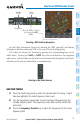
DIGITAL CLEARANCE RECORDER AND PLAYER (OPTIONAL)
The Audio Panel contains a digital clearance recorder that records up to 2.5 minutes
of the selected COM radio signal. Recorded COM audio is stored in separate memory
blocks. Once 2.5 minutes of recording time have been reached, the recorder begins
recording over the stored memory blocks, starting from the oldest block.
An optional external Play button controls the play function. Pressing the Play
button once plays the latest recorded memory block.
Pressing the MKR/MUTE Key during play of a memory block stops play. If a COM
input signal is detected during play of a recorded memory block, play is halted.
Pressing the optional Play button while audio is playing begins playing the
previously recorded memory block. Each subsequent press of the Play button selects
the previously recorded memory block.
Powering off the unit automatically clears all recorded blocks.
INTERCOM VOLUME AND SQUELCH
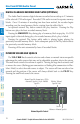
The VOL/CRSR Knob controls selection and volume or manual intercom squelch
adjustment for audio sources that may not be adjustable anywhere else in the system.
The small knob controls the volume or squelch. Turning the large knob activates and/
or moves the cursor (flashing green annunciator or flashing blue annunciator in Blue-
Select Mode) to select the audio source to adjust. The cursor will time-out after a few
seconds and the position of the cursor will always default back to the PILOT Key.
Pressing the small knob cancels the cursor.
Volume/Squelch Control
Manual Squelch Annunciator; Off for
Automatic Squelch, On for Manual
Squelch
Volume or Manual Squelch
Relative Volume/
Squelch Scale
Cursor