
Cockpit Reference Guide

Garmin G1000H
™
Cockpit Reference Guide for the Bell 407GX
190-01254-00 Rev. B
12
Nav/Com/XPDR/Audio Panel
Flight
InstrumentsEICAS
Nav/Com/
XPDR/AudioAFCSGPS Nav
Flight
PlanningProcedures
Hazard
Avoidance
Additional
Features
Abnormal
Operation
Annun/
AlertsAppendixIndex
Active
Fields
Standby
Fields
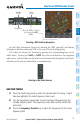
Tuning Box
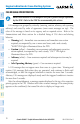
COM2 Radio is Selected on the
Audio Panel
Selecting a COM Radio for Transmit
SELECTING A NAV RADIO
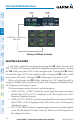
A NAV radio is selected for navigation by pressing the CDI Softkey located on the
PFD. The active NAV frequency selected for navigation is displayed in green. Pressing
the CDI Softkey once selects NAV1 as the navigation radio. Pressing the CDI Softkey
a second time selects NAV2 as the navigation radio. Pressing the CDI Softkey a third
time activates GPS mode. Pressing the CDI Softkey again cycles back to NAV1.
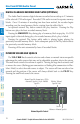
While cycling through the CDI Softkey selections, the NAV Tuning Box and the
Frequency Transfer Arrow are placed in the active NAV Frequency Field and the active
NAV frequency color changes to green.
The three navigation modes that can be cycled through are:
• VOR1(orLOC1)–IfNAV1isselected,agreen single line arrow (not shown)
labeled either VOR1 or LOC1 is displayed on the HSI and the active NAV1
frequency is displayed in green.
• VOR2(orLOC2)–IfNAV2isselected,agreen double line arrow (shown) labeled
either VOR2 or LOC2 is displayed on the HSI and the active NAV2 frequency
is displayed in green.
• GPS–IfGPSModeisselected,amagenta single line arrow (not shown) appears
on the HSI and neither NAV radio is selected. Both active NAV frequencies are
then displayed in white.