
User Guide





COLONIZING PLANET
CHAPTER 4
95
ASSEMBLE GROUP sJ
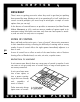
Orders your units to converge on the square with the active unit. When you
use the assemble group command, you see a window that allows you to cus-
tomize your group, with options to:
• Exclude units further than two squares away
• Exclude units with hold and sentry orders
• Exclude automated and patrol units
• Exclude ground, sea, air, offensive combat, defensive combat, terraformer,
or probe team units.
• Exclude other units
Once you’ve established the parameters of your group, L
ASSEMBLE AT CURSOR to
assemble the group at a spot you then select,
CANCEL GROUP to cancel all group
orders,
CANCEL to exit the screen without taking action, or OK to assemble the
group on the square with the active unit.
GO TO HOME BASE sG
The unit returns to its home base by the most direct route possible.
SET HOME BASE cH
If the active unit is in a base square, this command reassigns the unit to be
supported by that base. This command does not appear if the unit is not in a
base. See Home Base, Support and Pacifism, p. 89, for more on home bases.
ACTIVATE (MOVE NOW) A
Makes the unit under the cursor the active unit (see Active Units, p. 22). A
unit that has already exhausted all its movement points can still be activated
with this command, and given orders that don’t involve further movement in
the current turn.