
Operator's Manual





3. HOW TO MANAGE CHARTS
3-9
3.4 How to Delete ENC, ARCS Licenses
1. Get into the Chart maintenance mode.
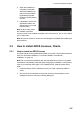
2. Click the [License] button on the InstantAccess bar.
3. Click the [ENC] or [ARCS] tab as appropriate to show a list of licenses.
4. Put a checkmark next to the license(s) to delete.
5. Click the [Delete Licenses] button to delete the license(s) selected.
3.5 How to Read ENC Judgment Information
You can find out if your installed ENC charts are official or unofficial, with the [Producer
Code] button in the [Licenses] dialog box. The following functions use this feature.
• [Filter] window (see section 3.15) can show or hide official or
unofficial charts.
• .Chart judgment is shown for unofficial charts on the [Check Results] of the [Route
Plan] dialog box (see section 9.3.5) if the corresponding alert check is active.
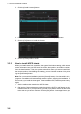
1. In the Chart maintenance mode, click the [License] button to show the [Licenses]
dialog box.
2. Click the [ENC] tab.
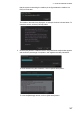
3. Click the [Producer Code] button.
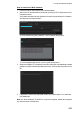
4. Select the judgment information file then click the [Open] button.
31 Sep 2015
31 Sep 2015
31 Sep 2015
31 Sep 2015
31 Sep 2015
31 Sep 2015
31 Sep 2015
31 Sep 2015
31 Sep 2015
31 Sep 2015
Official
Unofficial
Official: