
Operator's Manual
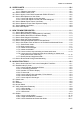
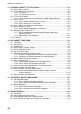
TABLE OF CONTENTS
v
3.20 How to Find the Chart Type..................................................................................... 3-25
3.21 How to Update ENC, C-MAP Charts Manually........................................................ 3-25
3.21.1 How to insert update symbols ..................................................................... 3-26
3.21.2 How to delete update symbols .................................................................... 3-27
3.21.3 How to modify existing update symbols ...................................................... 3-27
3.22 How to Synchronize Chart Data .............................................................................. 3-28
3.22.1 How to select the units to synchronize ........................................................ 3-28
3.22.2 How to check synchronization status .......................................................... 3-29
3.22.3 Manual updates and synchronization.......................................................... 3-30
3.23 How to Reconvert All SENC Charts ........................................................................ 3-30
4. HOW TO CONTROL CHART OBJECTS ..............................................................4-1
4.1 How to Browse Your Charts ...................................................................................... 4-1
4.2 How to Control Visibility of Chart Objects.................................................................. 4-1
4.2.1 How to set value for shallow contour, safety depth, safety contour and
deep contour.................................................................................................. 4-1
4.2.2 Basic Setting menu........................................................................................ 4-3
4.2.3 Chart Display menu....................................................................................... 4-4
4.2.4 Display base.................................................................................................. 4-5
4.3 How to Control Visibility of Symbols, Features.......................................................... 4-5
4.3.1 General page................................................................................................. 4-5
4.3.2 Tracking page................................................................................................ 4-7
4.3.3 Route page.................................................................................................... 4-8
4.3.4 Mariner page ................................................................................................. 4-8
4.3.5 Targets page ................................................................................................. 4-9
4.4 Control of Predefined IMO Chart Display Settings .................................................. 4-10
5. VECTOR (S57) CHARTS.......................................................................................5-1
5.1 Introduction to S57 Charts......................................................................................... 5-1
5.1.1 Definitions of terms........................................................................................ 5-2
5.1.2 Chart legend for S57 charts........................................................................... 5-2
5.1.3 Permanent warnings for S57 charts .............................................................. 5-3
5.2 Chart Viewing Dates and Seasonal Features of the S57 Chart ................................ 5-4
5.2.1 Introduction.................................................................................................... 5-4
5.2.2 How to approve and highlight S57 chart updates.......................................... 5-4
5.2.3 How to set Display date and Approved until dates........................................ 5-5
5.2.4 About chart viewing date dependency of S57 standard ................................ 5-5
5.3 Symbology Used in S57 Charts................................................................................. 5-6
5.3.1 Presentation library used for S57 chart features ........................................... 5-6
5.4 How to Find Information about S57 Chart Objects .................................................... 5-6
5.5 Admiralty Information Overlay (AIO).......................................................................... 5-8
5.5.1 Installation ..................................................................................................... 5-8
5.5.2 How to display the AIO.................................................................................. 5-8
5.5.3 Catalog of AIO cells....................................................................................... 5-9
5.5.4 How to find AIO chart object information..................................................... 5-10
5.5.5 How to select the information to display...................................................... 5-11
6. RASTER (ARCS) CHARTS ...................................................................................6-1
6.1 ARCS Charts ............................................................................................................. 6-1
6.1.1 Chart legend of ARCS chart.......................................................................... 6-1
6.2 Datum and ARCS Charts .......................................................................................... 6-5
6.3 Permanent Warnings of ARCS.................................................................................. 6-5
6.4 ARCS Subscriptions .................................................................................................. 6-6
6.4.1 ARCS Navigator ............................................................................................ 6-6
6.4.2 ARCS license information.............................................................................. 6-6