
Operator's Manual

2. OPERATIONAL OVERVIEW
2-16
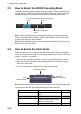
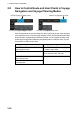
2.3 How to Select the ECDIS Operating Mode
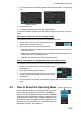
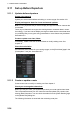
The ECDIS has three operating modes: Voyage navigation, Chart maintenance, and
Voyage planning. Select the mode from the Status bar with the [PLAN], [CHARTS]
and [NAVI] buttons. The background of the button of the active mode is blue.
Note 1: When switching between the Voyage navigation and Chart maintenance
modes it may take several minutes to read the chart database when using C-MAP
charts or there are many charts installed.
Note 2: If the equipment accepts no key operation after switching to the Chart main-
tenance mode, reset the power.
2.4 How to Select the Chart Scale
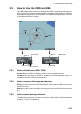
When you open a chart it is displayed with the default scale, called the compilation
scale. To change the chart scale, do one of the procedures shown below. The scale
range is 1:1,000 to 1:70,000,000.
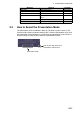
• Click the chart scale selection buttons in the Chart scale/presentation mode box.
• Right-click anywhere inside the Chart scale/presentation mode to show a drop-
down list of chart scales.
• Put the cursor anywhere on the chart and spin the scrollwheel.
Note: When the radar overlay is active the chart scale is shown in nautical miles (NM).
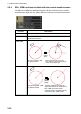
The table below lists the chart related messages and their meanings.
Message Meaning Remarks
Display date is not current Displayed date is not the current
date.
Non-ENC data ENC non-compatible chart in use.
Large scale ENC available Larger scale available at current
position (TM reset ON) or cursor
location (TM reset OFF).
Overscale Scale too large.
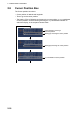
For Voyage navigation
mode
For Voyage planning
mode
For Chart maintenance
mode
ECDIS
Chart scale indication
Chart scale
selection buttons
Chart
related message