
Operator's Manual





2. OPERATIONAL OVERVIEW
2-7
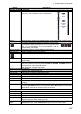
Button Description
Voyage navigation mode bar
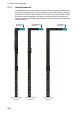
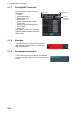
Minimizes the InstantAccess bar. To restore the maxi-
mized bar, click anywhere on the minimized bar.
Route Route functions: select route, deselect route, move route to plan, monitor route.
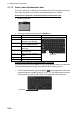
Processes AIS Safety and Navtex messages. If you have un-
read Navtex or Safety messages, the icon changes as shown
right; “S” for unread Safety, “N” for unread Navtex, “S/N” for
unread Safety and Navtex.
Manual Update Shows the menu for manual update of chart objects.
Mini Conning Shows, hides the mini conning display.
Activates or deactivates the weather overlay.
Instant Track Creates a temporary track to return to or make a temporary detour from the mon-
itored course.
TCS Controls for use with specific Autopilots (see chapter 26). TCS Setting* has two
buttons for selection of steering mode, Go AW and Go SEA. TCS State shows or
hides the [Track Control Status] window.
*Not shown with Autopilot FAP-2000.
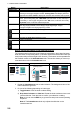
Chart maintenance mode bar
Minimizes the InstantAccess bar.
AUTO Load Automatically loads and installs ENC charts.
Manage Charts Deletes charts; installs charts manually.
Cell Status Finds cell status.
License Enters license information.
Public Key Shows the current public key. The public key changes each time a new one is
installed.
System Functions for chart synchronization. Sync Config selects the ECDIS units to syn-
chronize. Sync Status checks synchronization status. Reconvert reconverts out-
dated SENC charts to the corresponding current ones.
Voyage planning mode bar
Minimizes the InstantAccess bar.
Planning Creates routes and user charts.
Report Displays route and user chart reports.
Guide Box Shows or hides the guide box, which provides range and bearing measurement
between waypoints when creating a route.
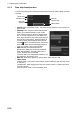
Manage
Data
Manages routes and user charts. Route imports, exports, deletes routes. User
Chart deletes user charts. Data Import imports routes and user charts.
Click
anywhere
on the
minimized
bar
Click
arrow
N
S