
Operator's Manual



2. OPERATIONAL OVERVIEW
2-4
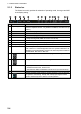
2.1.2 Status bar
The Status bar mainly provides for selection of operating mode, chart type and IMO
chart display setting.
No. Button Description
1 Operating mode Selects the operating mode, ECDIS or conning. (If the conning display
is fed to a separate monitor, only ECDIS is available; the button is inop-
erative.)
2 NAVI Selects the Voyage navigation mode.
3 CHARTS Goes to the Chart maintenance mode.
4 PLAN Selects the Voyage planning mode.
5 OTHERS • Sets system in standby.
• Plays back log data (AMS connection must be off).
6 CHART ONLY Shows only the chart, when the left button is pressed and held down.
7 STD DISP Restores the IMO standard display instantly.
8 Chart priority Selects chart priority when both vector or raster are available.
9 Chart database Selects the pre-defined presentations of ENC content: IMO BASE, IMO
STD or IMO ALL. CUSTOM appears when the symbols selected or de-
selected on the [Chart Display] menu do not match the preset conditions
for IMO BASE, IMO STD or IMO ALL.
10 Displays the operator's manual, ECDIS program no. and system info.
11 Manages user profiles; opens the Settings menu.
12 Date • Displays the date.
• Selects the time to use, local or UTC.
• Sets the time difference between local and UTC (to use local time).
13 Time Shows the time, UTC or local.
14 Rotates clockwise if the system is working properly. If it is not spinning
the system is not working. Shortly after it stops spinning the buzzer
sounds. Reset the power to restore normal operation.
NAVI