
Operator's Manual



2-1
2. OPERATIONAL OVERVIEW
2.1 ECDIS Display
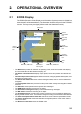
The ECDIS (Electronic Chart Display and Information Systems) screen is divided into
several areas, as illustrated below. (The illustration shows the layout for the FURUNO-
monitor. The layout may be slightly different with the Hatteland monitor.)
• The Status bar provides for selection of operating mode, chart format, IMO chart display;
one-click restoration of IMO standard display, etc.
• The Sensor information box displays ship's speed, course and position and selects sen-
sors.
• The Own ship functions box applies offset to the chart; changes geodetic data system, and
provides true motion reset.
• The Route information box shows route and waypoint data, when a route is selected for
navigation.
• The Overlay/NAV Tools box provides for setup of the radar overlay and navigation-related
functions.
• The Alert box shows operational and system alert messages.
• The VRM boxes measure the range to an object.
• The Permanent warning box displays chart-related warning messages.
• The EBL boxes measure the bearing to an object.
• The InstantAccess bar provides quick access to functions such as brilliance adjustment,
display palette and the menu. The contents change according to the ECDIS mode selected.
• The Chart scale/presentation mode box selects the chart scale and presentation mode.
• The Cursor position box shows the latitude and longitude position of the cursor and the
TTG to the cursor.
• The Electronic chart area shows the ECDIS chart.
Status bar
Sensor
information
box
Alert
box
EBL1 box, EBL2 box
Instant
A
ccess
bar
VRM1 box, VRM2 box
Electronic chart area
Own ship
functions
box
Route
information
box
Permanent
warning box
Cursor position
box
Chart scale/presentation mode
box
Overlay/
NAV Tools
box
TC:
TC: MANUAL
Instant
Track