
Operator's Manual



1. INTRODUCTION
1-17
1.18.2 Function availability
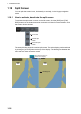
1.18.3 Split screen usage characteristics
Item
Viewable Operable
Main Sub Main Sub
AIS target Yes Yes Yes Yes
Anchor watch Yes Yes Yes No
Chart display Yes Yes Yes No
Danger highlight Yes Yes Yes No
Divider Yes Yes Yes No
EBL, VRM Yes Yes Yes Yes
Parallel index lines Yes Yes Yes Yes
Radar overlay Yes No Yes -
Range rings Yes Yes Yes No
TT Yes Yes Yes Yes
Weather overlay Yes No Yes -
• If the sub view is not displayed correctly, restore the full screen display then try to ac-
tivate the split screen again.
• The display may not be updated when switching to the Voyage planning mode. If this
occurs, switch to the Voyage navigation mode, restore the split screen display then re-
turn to the Voyage planning mode.
• The own ship mark may not appear at the screen center when releasing the split
screen display. If this occurs, click the indication "TM/CU Reset" at the top right posi-
tion on the screen to show the own ship mark at the screen center.
• The TM reset feature only works on the active display. To return the own ship mark to
the screen center, click the indication [TM/CU Reset] at the top right position on the
screen.
• The sub view can use a location and chart scale different from the main view.
• The chart scale related messages (overscale, larger ENC available, etc.), which ap-
pear beneath the chart scale indication, show only on the main view.
CAUTION
Changes to settings, including safety fea-
tures such as safety contour, are only re-
flected on the main view when the split
screen is in use.
For that reason use caution when observing
the sub view.