
Operator's Manual

26. AUTOPILOT OPERATIONS
26-14
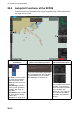
26.4 Autopilot Functions at the ECDIS
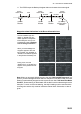
Autopilot functions are available in the Voyage navigation mode. Click the [NAVI] but-
ton to get into this mode.
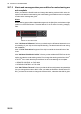
(1)
TCS buttons
(2)
[Track Control Status] window
(3)
[Route Information] box
The buttons in the TCS but-
ton group do the following
tasks. See section 26.6.
[TCS]: Opens the TCS but-
ton group.
[TCS Setting]*: Selects a
steering mode, [GoAW] or
[GoSEA]. *Not shown on
FAP-2000.
[TCS State]: Shows or hides
the [Track Control Status]
window. See
"Messages" on page 26-19.
The [Track Control Status] window dis-
plays a message when the route steer-
ing preconditions are not complete.
See "Messages" on page 26-19.
The [TC] field shows Autopi-
lot status. In the example
above, the status is [GoAW
Appr. Enabled]. See
section 26.7.1 for a descrip-
tion of the autopilot status
information that appears in
this box.
[Track Control Status]
Preconditions for Track Control Start are missing:
AP connection error.
TC: MANUAL
Instant
Track
TCS
Setting
Go
AW
Go
SEA
TCS
State
[Track Control Status]
Preconditions for Track Control Start are missing:
AP connection error.
TC: GoAW Appr. Enabled