
Operator's Manual

26. AUTOPILOT OPERATIONS
26-4
26.2.2 EMRI FAP-3000
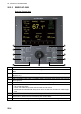
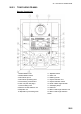
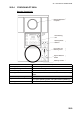
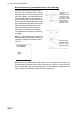
Steering Control Unit
No. Description
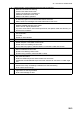
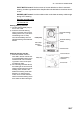
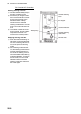
1 PROGRAM NEXT button: Shows next heading, next course, next radius, next rudder limit
field.
2 CALL REMOTE CTRL button: Initiates integrated control with external navigation equipment
(ECDIS, etc.)
3 CALL COURSE CTRL button: Heading-controlled course change using set radius
4 CALL HEADING CTRL button: Immediate heading-controlled course change using set rud-
der angle limit.
5 RADIUS button: Immediate radius-controlled course change using set radius.
6 Tiller
• Set course and radius.
• PORT and STBD lamps show when the tiller can set course.
• INCREASE and DECREASE lamps show when the tiller can set radius or rudder angle
limit.
7 EXECUTE button: Push to start course change.
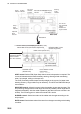
8-10 SELECT buttons, arrow buttons: Select item to set (manual speed value, auto speed, rudder
limit function, performance and conditions) with arrow buttons.
11 ALERT ACKN button: Lights when alert is generated; push to acknowledge alert.