
Operator's Manual

26. AUTOPILOT OPERATIONS
26-3
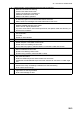
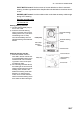
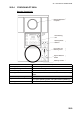
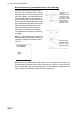
9 Status indicator - Shows selected mode and state of readiness:
• ROUTE: FAP-2000 route steering
• TRACK: FAP-2000 control mode
• TURN: FAP-2000 track controlled turn
• HEADING: FAP-2000 control mode
• READY: FAP-2000 in operation
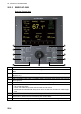
10 Alert indicator and buzzer control:
• ALARM lamp lights for FAP-2000 related alarms and errors.
• RESET button acknowledges FAP-2000 related alarms and errors.
11 Special function buttons:
• MANUAL SPEED: Manually enter speed.
• FUNC. SETUP: Adjust panel dimmer.
• Up, Down arrow buttons: Set manual speed value, auto speed, rudder limit function, per-
formance and conditions.
12 Set heading display includes:
• Off course alert
• Turn side
• Rudder-on limit indication
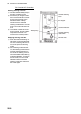
13 Gyro reading and a bar graph showing rate of turn
14 Rudder displays:
• Rudder set point in the Radar Control mode.
• Rudder limit in the Heading Control mode.
• AUTO LIMIT lamp lights to indicate selection of automatic rudder limit function.
15 Speed displays:
• ROT in the Radar Control mode.
• Speed in the Heading Control mode.
• Speed warning indicator (LOG FAILURE or LOW).
16 Tiller:
• Set course and radius.
• PORT and STBD lamps show when the tiller can set course.
• INCREASE and DECREASE lamps show when the tiller can set radius or rudder angle
limit.
17 START HEADING CHANGE button:
• Flashes if the newly set heading is different from used set heading.
• Push to start course change.
18 ACKN WARNING button:
• Lights when an alert is generated.
• Push to acknowledge an alert.