
Operator's Manual

25. ALERT MANAGEMENT SYSTEM (option)
25-13
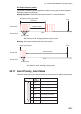
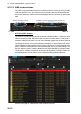
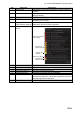
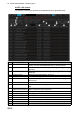
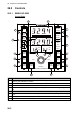
ALERT LIST window
The [ALERT LIST] window provides a context-based list of generated alerts, by source
and priority.
No. Item name Description
1 Current Alert box This box shows the name of the active alert(s), in order of pri-
ority.
2 Alert Source window Alert sources, [Navigation], [Communication], [External].
3 Priority filter Filter the list by the alert priority, [Emergency], [Alarm], [Warn-
ing], [Caution].
4 Category filter Filter the list by the alert category, A, B or C.
5[], []
(page selection buttons)
Select the page to display, when there are more than 20
alerts.
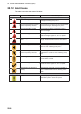
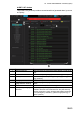
6 Alert state icon Shows alert state. (Active alerts only)
7 Alert priority, category,
alert text
The data (priority, category, alert no., alert name) of all alerts
related to the alert source selected from the [Alert Source]
window are shown in green. However active alerts are shown
in red (emergency and alarm), yellow-orange (warning) or
yellow (caution).