
Operator's Manual

25. ALERT MANAGEMENT SYSTEM (option)
25-12
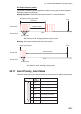
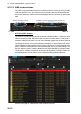
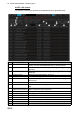
ALERT LOG window
The [ALERT LOG] window provides a comprehensive list of generated alerts.
No. Item name Description
1 Current Alert box This box shows the name of the active alert that has the highest
priority. You can acknowledge the alert by clicking the box.
2 Priority Filter Filter the list by the alert priority, [Emergency]. [Alarm], [Warning],
[Caution].
3 Source Filter Filter the list by the source of alert, [Navigation], [Communication],
[External].
4 Category Filter Filter the list by alert category, A, B or C.
5 Log Search box Enter the text string to search.
6 Search button Click this button to search the text string entered in the [Log
Search] box.
7 Reset button Stop the text search and restore the list to its pre-search state.
8 Export Log button Export the contents of the log to a USB flash memory, in .dat for-
mat.
9[], []
(page selection buttons)
Select the page to display, when there are more than 20
alerts. Greyed out when inoperative.
10 Priority Priority of the alert.
11 Cat. Category of the alert.
12 Alert Text Alert no. and name of alert.
13 Source The name of the device that generated the alert.
14 Occurred Time(UTC) The time (UTC) the alert occurred.
15 ACKed Time(UTC) The time (UTC) the alert was acknowledged.
16 Rectified Time(UTC) The time (UTC) the alert was rectified.