
Operator's Manual

25. ALERT MANAGEMENT SYSTEM (option)
25-11
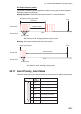
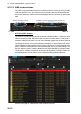
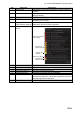
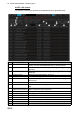
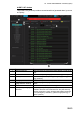
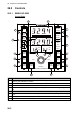
No. Item name Description
1 Priority Filter Filter the list by alert priority, [Emergency], [Alarm], [Warning],
[Caution].
2 Source Filter Filter the list by the source of the alert, [Navigation], [Communi-
cation], [External].
3 Category Filter Filter the list by category, A, B or C.
4 Decision Support box Displays the reason for an alert and troubleshooting tip when an
information icon is clicked.
5[], []
(page selection buttons)
Select the page to display, when there are more than 20
active alerts. Greyed out when inoperative.
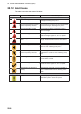
6 Alert Icon description
button
Provides a description of the alert icons.
7 Alert state icon Show alert state by icon.
8 Alert Text Displays alert no. and name of alert.
9 Source The name of the device that generated the alert.
10 Occurred Time(UTC) The time (UTC) the alert occurred.
11 ACKed Time(UTC) The time (UTC) the alert was acknowledged.
12 Information icon Click the icon to display a description of the alert (reason for alert
and troubleshooting tip) in the Decision Support box. Note that
some alerts provide no information.
13 Silence button Silence the buzzer.
Emergency/Alarm
icons (Red)
Warning icon
(Yellow-orange)
Caution icon
(yellow)
A
larm icon (Red)
Warning icon
(Yellow-orange)