
Operator's Manual

25. ALERT MANAGEMENT SYSTEM (option)
25-10
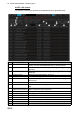
25.13.2 AMS mode windows
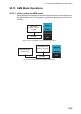
The AMS mode shows alert information in three windows: [ACTIVE ALERT], [ALERT
LOG] and [ALERT LIST]. The windows can be selected with the corresponding but-
tons on the Status bar. Alerts can be acknowledged from any window, by clicking the
alert.
ACTIVE ALERT window
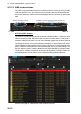
The [ACTIVE ALERT] window shows the status of all active alerts. A maximum of 20
alerts is shown per page. When there are more than 20 active alerts, a new page is
created to hold the new alerts. You can move between pages with the arrow buttons.
The background color of an unacknowledged emergency or alarm flashes red and an
unacknowledged warning flashes yellow-orange. The text of an acknowledged emer-
gency or alarm is red and the text of an acknowledged warning is yellow-orange. The
text of a caution is yellow. Category B alerts can be acknowledged by clicking the alert.
The buzzer for category A alerts can be temporarily stopped by clicking the alert; but,
acknowledgement must be done from the equipment that generated the alert.
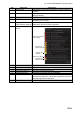
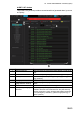
See the next page for a description of the contents of the list.
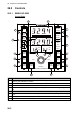
Window selection buttons
Operating buttons, indications (See page 22-2.)