
Operator's Manual


25. ALERT MANAGEMENT SYSTEM (option)
25-8
25.12 Alert Icons
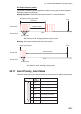
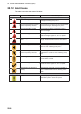
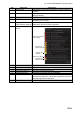
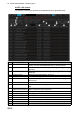
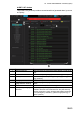
The alert icons show the state of all alerts.
Alert priority: Emergency, Alarm
Alert priority: Warning
Icon Alert state Icon description
Not acknowledged/Not rectified
Not acknowledged/Not rectified
Buzzer temporarily silenced
Caution
Red triangle with black loudspeaker in center
of triangle. Flashing every 0.5 s.
Acknowledged/Not rectified
Not acknowledged/Rectified
Not acknowledged/Rectified
Red triangle with crossed out black loudspeaker
in center of triangle. Flashing every 0.5 s.
Red triangle with black exclamation point in
center of triangle.
Red triangle with black check mark in
center of triangle. Lights 3 s, off 1 s, repeat.
Not acknowledged/Not rectified
Not acknowledged/Not rectified
Buzzer temporarily silenced
Acknowledged/Not rectified
Yellow-orange circle with black loudspeaker in
center of circle. Flashing every 0.5 s.
Yellow-orange circle with crossed out black
loudspeaker in center of circle. Flashing every
0.5 s.
Yellow-orange circle with black exclamation
point in center of circle.
Yellow-orange circle with black check mark
in center of circle. Lights 3 s, off 1 s, repeat.
Steadily displayed yellow square with black
exclamation point in center of square.
Alert priority: Caution
Acknowledge not allowed for
alarm
Red triangle with black cross in middle of
triangle. Presented with first two icons above.
Acknowledge not allowed for
warning
Yellow-orange circle with a cross in middle of
circle. Presented with first two warning icons
above.