
Operator's Manual





24. MAINTENANCE AND TROUBLESHOOTING
24-3
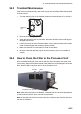
24.3 Trackball Maintenance
If the cursor moves abnormally, dust or dirt may be on the trackball. Clean the trackball
as shown below:
1. Turn the retaining ring on the trackball module counterclockwise 45° to unlock it.
2. Remove the retaining ring and ball.
3. Clean the ball with a soft, lint-free cloth, then blow carefully into the ball-cage to
dislodge dust and lint.
4. Look for a build-up of dirt on the metal rollers. If dirty, clean the rollers with a cotton
swab moistened lightly with isopropyl-rubbing alcohol.
5. Make sure that fluff from the swab is not left on the rollers.
6. Re-set the ball and retaining ring. Be sure the retaining ring is not inserted re-
versely.
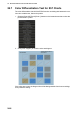
24.4 How to Clean the Filter in the Processor Unit
Have a qualified technician clean the air inlet filter in the Processor Unit when it be-
comes dusty. Remove the filter and clean it with water and a mild detergent. Rinse the
filter, allow the filter to dry then return it to the Processor Unit.
Note 1: Be sure the air inlet is not blocked. A blocked inlet can cause the temperature
to rise inside the cabinet, which can lead to malfunction.
Note 2: The right side of the Processor Unit has an exhaust vent. Remove dust from
the vent as necessary.
Retaining
ring
Filter
Air inlet
Processor unit, left side