
Operator's Manual






1. INTRODUCTION
1-11
1.11 How to Enter Heading
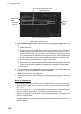
Heading can be entered manually or automatically. Heading data is checked for integ-
rity (see section 18.7 for details), and the data is judged as [Passed], [Doubtful] or
[Failed]. The integrity check results appear on the [HDG] page, shown below. (The re-
sults do not appears when the TCS is engaged.)
Passed (green): Data is available for comparison and data is normal.
Doubtful (yellow): Data is not available for comparison, but data is normal.
Failed (red): Data may or may not be available for comparison, and data is abnormal.
Note: If there is only one gyro connected to the ECDIS, heading data is compared to
COG from GPS. When the speed is five knots or less, and COG is unstable when it is
compared to heading data, the message “Doubtful” appears for heading data. When
the ship’s speed becomes greater than 10 knots and COG stabilizes, the message
disappears after a short while.
1. Right-click anywhere in the [Own ship informa-
tion] box to show the context-sensitive menu.
2. Click [Open MENU].
3. Click [System Sensor Settings] or [Local System
Settings] as applicable.
4. Click the [HDG] tab.
Open MENU
Local sensor settings
System sensor settings
Fill circle for automatic
heading input
Integrity
check
result
GYO001
Fill circle for
gyro correction
GYRO1
GYRO1
GYO001
GYO002
GYO002
Fill circle for
manual heading
Second shows
Integrity as
“Not available”
when only one
gyrocompass
is connected.
Doubtful
Sensor list
Doubtful