
Operator's Manual




22-1
22. CONNING AND MINI CONNING
DISPLAYS
22.1 Conning Display
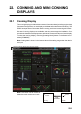
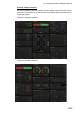
The conning display provides relevant sensor information data (including engine data)
from external equipment, on one display to facilitate safe and efficient monitoring. The
ECDIS accepts sensor information data in analog, serial and contact signal formats.
Six sets of conning displays are available, and they are arranged at installation. Con-
sult with the installer of the equipment to decide the content and layout of each display.
To show the conning display, click the [Operating Mode] button on the Status bar to
select [CONNING].
Note: Analog data is shown in the lowest value of the setting range when the data is
not input.
Note: The cursor can be moved be-
tween the main monitor and a sub
Pitch And Roll
ROLL PITCH
3.8°
-2°
Azimuth
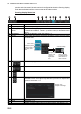
Conning display Status bar (see next page)
17.5°
05 Mar 2014
05 Mar 2014
UTC
Main monitorSub monitor
ECDIS
Cursor
Conning
Cursor
Push
scrollwheel