
Operator's Manual

20. ALERTS
20-8
20.6 Alert Log
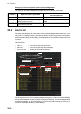
The [Alert Log] stores and displays the latest 10,000 alerts. To display the log, right-
click the [Alert List/Alert Log] button then select [Alert Log Window]. The log shows the
following information for each alert:
You can select what priority and category of alerts to display with the [Priority] and
[Category] filters at the top of the list. The list can be sorted by [Priority], [Cat.], [De-
scription] or Time (Occurred, Rectified, ACKed). Click the corresponding column title
to sort accordingly. To find information about an alert, select it to show the information
in the [Detail] box. To search the log, enter text in the [Log Search] box then click the
[Find] button. You can save the contents of the log to a USB flash memory, in .dat for-
mat, by clicking the [Export Log] button.
20.7 Alert Reception from Connected Sensors
An "ALR receive and ACK transmit" communication is available for every serial line
input. The ALR message from the sensor includes information about alerts from the
sensor, and is presented though the normal alert system. When you acknowledge an
alert, an ACK message is sent to the sensor to do remote acknowledge.
This interface is based on IEC 61162-1 and IEC 80/520/INF.
• Priority of alert (Emergency, Alarm, Warning, Caution)
• Category of alert (A, B or C)
• Alert description (alert no., alert text)
• Source of alert
• Occurred Time (UTC)
• ACKed Time (UTC)
• Rectified Time (UTC)
• Alert details
Priority
Category
Occured
time
Alert text
Alert no.
Alert Details
Category
filter
Source
Priority
filter