
Operator's Manual
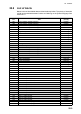

20. ALERTS
20-7
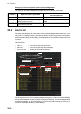
The [Filter] checkboxes at the top of the window let you select what alerts to view.
Check or uncheck the boxes to show or hide the corresponding alerts.
To find details about an alert, click the applicable alert info icon at the left side of the
window to show the details in the [Detail] box at the top of the window. The box shows
the reason for the alert, how to handle the alert, etc.
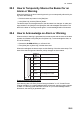
An individual emergency, alarm or warning can be acknowledged by clicking it.
The [Silence] button silences the buzzer.
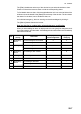
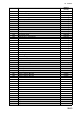
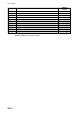
How the alert list is updated after acknowledgement, rectification
When you acknowledge an alert, its display method on the [Alert] list changes accord-
ing to alert category and alert state. Acknowledged and rectified alerts are immediately
removed from the list.
No.
Alert
priority
Alert state
Display after
acknowledgement
Display after
rectifying
1 Emergency,
Alarm
Not acknowledged, Not rectified 5 2
2 Not acknowledged, Rectified 8 –
3 Warning Not acknowledged, Not rectified 6 4
4 Not acknowledged, Rectified 9 –
5 Emergency,
Alarm
Acknowledged, Not rectified – 8
6 Warning Acknowledged, Not rectified – 9
7 Caution Not rectified – 10
8 Emergency,
Alarm
Acknowledged, Rectified – –
9 Acknowledged, Rectified – –
10 Caution Rectified – –