
Operator's Manual





20. ALERTS
20-5
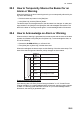
20.3 How to Temporarily Silence the Buzzer for an
Alarm or Warning
When the buzzer for an alarm or warning sounds, you can temporarily silence it by do-
ing one of the following:
• Click the buzzer stop button in the [Alert] box.
• In the [Alert List], click the [Silence] button.
The buzzer stops and the appearance of the alert state icon changes. An alert mes-
sage remains n the [Alert] box and [Alert] list until acknowledged and rectified. The
alert for the alarm or warning sounds again if not acknowledged within 30 seconds.
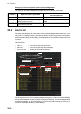
20.4 How to Acknowledge an Alarm or Warning
When an alarm or warning is generated, the buzzer sounds and the name of the alert
appears and flashes in the [Alert] box and [Alert List]. To acknowledge the alert, do
one of the following:
• Operate the ALARM ACK key on a Control Unit.
• In the [Alert] box or [Alert List], click the alert name.
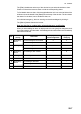
When acknowledged, the buzzer stops and the flashing of the alert name stops. The
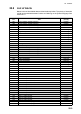
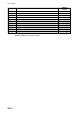
state of the alert changes and the alert priority changes as shown below
Unacknowledged warning alerts
If the Warning alert 150 "Early Course Change Indication" or 151 "Actual Course
Change Indication") is not acknowledged within 30 seconds, then the priority changes
to Alarm. If a Warning (other than Alert 150 and 151) is not acknowledged within
60seconds, the warning is generated again.
Priority of
alert
Alert state
High
1
Not acknowledged, Not rectified
Priority no.
2 Warning
3
4 Warning
5
6 Warning
Low
Not acknowledged, Not rectified
Not acknowledged, Rectified
Not acknowledged, Rectified
Acknowledged, Not rectified
Acknowledged, Not rectified
Not rectified
7 Caution
Emergency,
Alarm
Emergency,
Alarm
Emergency,
Alarm