
Operator's Manual





20. ALERTS
20-4
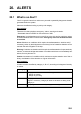
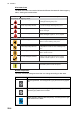
Alert state icons
The table shows the icons used to indicate the different alert states for the emergency,
alarm, warning and caution alerts.
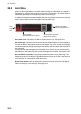
Buzzer stop button
The color of both the background and the icon change according to alert state.
Button state Description
No alert generated. The background is grey and the icon is greyed
out.
An emergency, alarm or warning is being acknowledged. The back-
ground is grey and the icon is white.
Button clicked to silence buzzer temporarily. The background is light-
blue and the icon is black.
Alert priority: Warning
Icon Alert state Icon description
Not acknowledged, Not rectified
Not acknowledged, Not rectified
Buzzer temporarily silenced.
Caution
Red triangle with black loudspeaker in center
of triangle. Flashing every 0.5 s.
Acknowledged, Not rectified
Not acknowledged, Rectified
Not acknowledged, Rectified
Red triangle with crossed out black loudspeaker
in center of triangle. Flashing every 0.5 s.
Red triangle with black exclamation point in
center of triangle.
Red triangle with black check mark in
center of triangle. Lights 3 s, off 1 s, repeat.
Not acknowledged, Not rectified
Not acknowledged, Not rectified
Buzzer temporarily silenced
Acknowledged, Not rectified
Yellow-orange circle with black loudspeaker in
center of circle. Flashing every 0.5 s.
Yellow-orange circle with crossed out black
loudspeaker in center of circle. Flashing every
0.5 s.
Yellow-orange circle with black exclamation
point in center of circle.
Yellow-orange circle with black check mark
in center of circle. Lights 3 s, off 1 s, repeat.
Steadily displayed yellow square with black
exclamation point in center of square.
Alert priority: Caution
Alert priority: Emergency, Alarm