
Operator's Manual





19. RECORDING, PLAYBACK FUNCTIONS
19-11
19.6 How to Playback the Log
The log can be played back to check ship’s movements within a given time frame. If
an AMS is connected, deactivate it to enable playback.
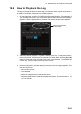
1. On the Status bar, click the [OTHERS] and [Playback] buttons. The message "If
you use playback function, you cannot use other function before ECDIS restarts."
appears. Click the [OK] button to proceed. The window shown below appears.
2. Select the date to playback. Log data is stored by the day. To play back data in
the current month, click a day in the calendar. For other dates, click the [] or []
button to select the month and then click a day in the calendar. To playback the
current day, click the button at the top of the screen.
3. Click the [OK] button, and the dialog box shown on the next page appears. This
box has controls for
• Start and End times
• Time elapsed
• Slider bar (drag the bar to change start time)
• Playback speed list box (change the playback speed). The choices are x1, x2,
x4, x10 and x60.
Click to playback data
of current day.