
Operator's Manual






1. INTRODUCTION
1-5
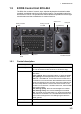
1.6 Trackball Control Unit RCU-026
The RCU-026 has a power key, a trackball module (trackball, scrollwheel and left and
right mouse buttons), a status LED, and a USB port. The trackball module functions
like a PC mouse; the user rolls the trackball and operates the left and right buttons and
the scrollwheel to do various functions.
Control Description
Power key Turns the system on or off. (With a FURUNO or Hatteland monitor unit, the mon-
itor is also turned on/off with this key.)
Status
LED
The color and state of the LED change according to system or alert status. See
the LED status description on page 1-3.
Left
button
• Does the operation related to the object selected.
• Confirms the operation done for the object selected.
Scrollwheel • Select options.
• Selects chart scale.
• Sets numeric data.
The scrollwheel does not have a “push” function.
Right
button
• Displays context-sensitive menu when cursor is put in the display area.
• Cancels operation done on the object selected.
Trackball • Moves the cursor.
• Selects an object.
USB port For connection of USB flash memory (FAT16 or FAT32 format). Do not connect a
USB HDD or PC keyboard. The DVD drive (Maker: TEAC, Type: PU-DRV10) is
for chart updates.
Status
LED
Trackball
Power
key
Left
button
Right
button
USB port
Scrollwheel