
Operator's Manual



15. AIS SAFETY, NAVTEX MESSAGES
15-2
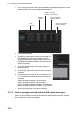
1. In the Voyage navigation mode, click the [MSG] and [Safety MSG] buttons on the
InstantAccess bar to show the [Message] dialog box.
2. Click the [New] button.
3. At [Send to], select where to send the message. Se-
lect [Broadcast] to send the message to all AIS-
equipped ships within communication range, or se-
lect [MMSI] and enter the MMSI of the ship where to
send the message.
4. At [Type], select the type of message, [Safety] or
[Binary] (routine).
5. At [Channel], select the channel to use to send the
message.
6. At [Description], enter the text of your message. The
no. of characters available depends on the type of
message.
Safety message broadcast: 161 characters
Binary message broadcast: 156 characters
Safety message addressed to MMSI: 156 characters
Binary message addressed to MMSI: 151characters
7. Click the [Send] button to send the message.
15.1.2 How to manage received and sent AIS safety messages
When an AIS message is received, the alert 539 “AIS Message Received” appears.
Do the following to view the message.
Type of message
(Binary, Safety)
Status of message
(Read, Unread)
MMSI of
sender
Date
received
MMSI of receiver
(MMSI or “Broadcast”)