
Operator's Manual

14. AIS TARGET FUNCTIONS
14-8
14.7 Automatic Activation of Sleeping Targets
14.7.1 Enabling, disabling automatic activation of sleeping targets
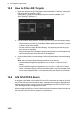
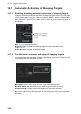
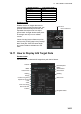
Enable or disable the automatic activation of sleeping targets from the [TT/AIS] page
of the [Overlay/NAV Tools] box. Click the indication below to enable or disable auto-
matic activation. The CPA/TCPA alarm must be active to get automatic activation of
AIS targets.
OFF: Turn off automatic activation.
AUTO ACT FILT: Activate the sleeping targets that meet the criteria set in
section 14.7.2.
AUTO ACT ALL: Activate all sleeping targets.
14.7.2 Conditions for automatic activation of sleeping targets
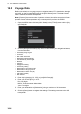
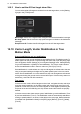
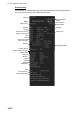
You can get automatic activation of sleeping AIS targets. Open the [TT/AIS] menu, se-
lect [Setting] then click the [Setting.1] tab.
Max Range: Set the max. range at which to get automatic activation.
Min Ship Speed: Set the minimum ship speed to get automatic activation.
Except Class B: Exclude class B AIS targets from automatic activation.
Be sure the label of the [OFF/ON] button shows [ON] for the items to use automatic
activation.
ON/OFF for automatic
activation of sleeping
targets
DISP ALL
AUTO ACT FILT
0.5NM 4min