
Operator's Manual

14. AIS TARGET FUNCTIONS
14-7
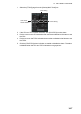
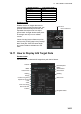
1. Select the [TT/AIS] page from the [Overlay/NAV Tools] box.
2. If the CPA and TCPA values are blank, click [CPA/TCPA] to show them.
3. Put the cursor on the CPA indication then use the scrollwheel or left button to set
the CPA.
4. Put the cursor on the TCPA indication then use the scrollwheel or left button to set
the TCPA.
5. Click the [CPA/TCPA] alarm indication to enable or disable the alarm. The alarm
is disabled when the CPA and TCPA indications are greyed out.
DISP ALL
AUTO ACT FILT
0.5NM 4min
CPA/TCPA
A
larm ON/OFF
CPA setting
TCPA setting