
Operator's Manual






1. INTRODUCTION
1-3
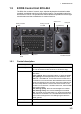
1.5 ECDIS Control Unit RCU-024
The RCU-024 consists of controls, keys, alphabet keyboard and trackball module
(trackball, scrollwheel and left and right mouse buttons). The trackball module func-
tions like a PC mouse. The operator rolls the trackball and operates the left and right
mouse buttons and the scrollwheel to do various functions.
1.5.1 Control description
Key Description
POWER key Turns the system on or off. (With a FURUNO or Hatteland mon-
itor unit, the monitor is also turned on or off with this key.)
Status LED The color and state of the LED change according to system or
alert status.
Green, lighting: Normal operation status; no alerts generated.
Red, lighting: Acknowledged alert (but not rectified) or SYS-
TEM FAIL. SYSTEM FAIL occurs when there is trouble in the
Processor Unit or communication failure between the Processor
Unit and an ECDIS Control Unit. Each Control Unit detects trou-
ble and its lamp flashes in red and the buzzer sounds. If this
condition occurs at the No. 1 ECDIS Control Unit, the SYSTEM
FAIL signal is output.
Red, flashing rapidly: Alert not acknowledged nor rectified.
Red, flashing slowly: Alert not acknowledged but rectified.
OFF: The heater on the CPU board is on, because the ambient
temperature is not at least 0°C. The heater takes about two min-
utes to warm the equipment. The LED lights green after the
heater goes off.
EBL rotary encoder Adjusts active EBL.
EBL 1 Activates or deactivates EBL 1.
POWER key
USB port
Rotary encoder
for EBL
Keyboard
Trackball module
Status LED
InstantAccess
knob
Rotary encoder
for VRM