
Operator's Manual





13. TRACKED TARGET (TT) FUNCTIONS
13-8
13.8 TT Source
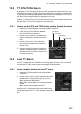
The TT source can be either a radar antenna or the TTM sentence. Normally, select
the radar antenna chosen to display radar echoes as the TT source.
To automatically select the radar currently displaying radar echoes as the TT source,
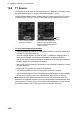
check the [SYNC. ANT] box on the [TT/AIS] page in the [Overlay/NAV Tools] box.
TT source and usage characteristics
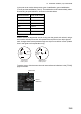
• Antenna (RAS001 to RAS010) or other sensor (OTR001 to OTR010) whose SFID
(Service Flow ID) starts with [RA].
Antenna example: RAS001 is shown as [ANT_1], RAS002 is shown as [ANT_2].
Other sensor example: The SFID set at installation; for example, RA0201.
• With [SYNC. ANT] checked, the antenna selected on the [Echo] page in the [Over-
lay/NAV Tools] box is marked with an asterisk.
• With [SYNC. ANT] checked, the checkmark is removed when a selection is made
the drop-down box.
• SYNC. ANT is inoperative if no antenna is registered.
• The reference position for the TTM sentence is the antenna position.
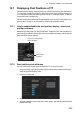
• The [CCRP/ANT] button in the TT/AIS page of the [Overlay/NAV Tools] box selects
the reference position to use in the TTM sentence, either CCRP or antenna.
Note: When the radar picture from the FCR-2xx9 or FAR-3xx0 series radar (IEC
623388 Ed. 2 compliant) is fed via LAN, there may be a difference between the radar
picture and the TT position. If this occurs, set the reference position as CCRP with the
[CCRP/ANT] button in the TT/AIS page of the [Overlay/NAV Tools] box.
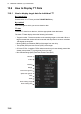
With SYNC. ANT checked, the
antenna chosen to display radar
echoes is automatically selected
as the TT source.
The TT source is either
antenna or TTM data
CCRP
button