
Operator's Manual





13. TRACKED TARGET (TT) FUNCTIONS
13-2
13.2 TT Symbols and TT Attributes
13.2.1 TT symbols
The symbols used in this equipment comply with IEC 62288.
13.2.2 TT symbol color and size
The color and size of the TT symbol can be changed to your liking. Note that the color
of the AIS symbol is also changed.
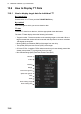
1. Click the [DISP], [SET] and [Symbol DISP] buttons on the InstantAccess bar to
show the [Symbol Display] menu.
2. Click the [Targets] tab.
3. Select the color among, green, blue, black, magenta and brown, with the [Color]
pull-down list.
4. Select the size from standard or small, with the [TT Size] pull-down list.
Symbol Default color Name Description
Green Past position point Marks a past position of a TT.
Green Target under
manual acquisition
A target acquired manually is initially indicated
with a dashed circle.
Green Acquired
target
Thick solid circle with vector indicating steady
state tracking (within three minutes after acquisi-
tion).
Red Dangerous
target
Dangerous TT (thick solid circle). The ECDIS has
its own definition for dangerous target limits, thus
a radar may show a target as dangerous while
ECDIS shows it as safe and vice versa.
Green Reference
target
Used to calculate own ship's over-the-ground
speed (echo-referenced speed) for ground stabili-
zation.
Red Lost target Mark a lost TT.
Green Target selected TT selected to show its data.
R 01