
Operator's Manual




11. HOW TO MONITOR ROUTES
11-2
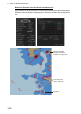
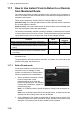
Method 2: Selection from the Route information box
Right-click the route name location in the [Route Information] box then select [Select
Route] to show the [Select Route] dialog box. Select a route then click the [Open] but-
ton.
TC: MANUAL
Chart alert area
(alarm, warning)
Waypoint
Red box indicates
detailed information
available in larger scale.