
Operator's Manual

9. ROUTES
9-12
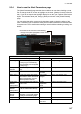
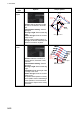
Search
type
Options Sample pattern
Expanding
square
Direction: Set the direction to start
the search, Clockwise or Anticlock-
wise.
Search Pattern Heading: See the
right figure.
Start Leg Length: Enter the start leg
length.
Number of Legs: Enter the number
of legs to use.
Starting at the probable location of
the target, the search vessels expand
outward in concentric squares.
Parallel
tracks
Direction: Select the direction to
start the search, Clockwise or Anti-
clockwise.
Search Pattern Heading: See the
right figure.
Start Leg Length: Enter the start leg
length.
Track Space: Enter the length of the
short legs in the route.
Number of Legs: Enter the number
of legs to use.
The parallel tracks pattern is usually
the first pattern used in undertaking a
search operation, since it assumes
that the search object is in the vicinity
of the track.
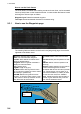
Start Point
WPT1
WPT2
Start Leg
Length
WPT3
WPT4
WPT5
W
PT6
Search
Pattern
Heading
90.00°
90°
90.00°
90.00°
WPT7
WPT8
Search
Pattern
Heading
(North ref.)
Start Leg
Length
Track space
Start Point