
Operator's Manual

9. ROUTES
9-8
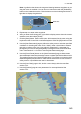
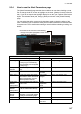
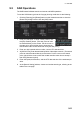
Context sensitive menus
A context-sensitive menu for setting the
draught is available on the [Alert Parame-
ters] page. Right-click [Draught] to show the
menu. [Set “ALL” setting to all legs] applies
the draught value of [Check type: All Legs] to all legs. [Clear setting] restores default
settings for each leg.
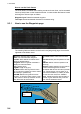
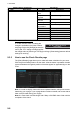
9.3.5 How to use the Check Results page
The [Check Results] page allows you to make safe water calculation for your route.
Click the [Check Route] button to do the check. After the button is operated, the alert
type and latitude and longitude position of the alert appear for applicable legs on the
route.
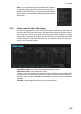
Note 1: In order to display charts with correct updated situation, always use current
date during your voyage. If your voyage lasts more than one week, set current date at
least once per week during your voyage.
Note 2: A route check can take longer with C-Map or CM-ENC charts. Wait until the
completion of the check.
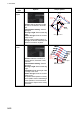
Military Practice
Area
Military practice area
Seaplane Land-
ing Area
Seaplane landing area
Submarine Tran-
sit Lane
Submarine transit lane
Anchorage Area Anchorage area
MarineFarm
Aquaculture
Marine farm aquaculture
PSSA Area Particularly Sensitive Sea Area
Non-official ENC No official ENC data
No Vector Chart No vector chart for area.
Not Up-to-date Chart not up to date.
Permit Expired Permit for chart has expired.
UKC Limit Under keel clearance limit
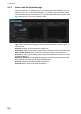
Radio buttons, input boxes Alert items
Item Description Item Description
Set “ALL” setting to all legs
Clear setting
Route Bank