
Operator's Manual

9. ROUTES
9-4
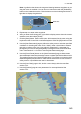
How to use the Undo feature
The Undo feature, available when creating a route and a user chart, can be accessed
from the [Undo] button on the InstantAccess bar. In route creation the feature is used
with waypoint and text input as follows:
Waypoint input: Delete last-entered waypoint.
Text input: Erase last-entered character or character string.
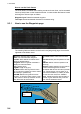
9.3.1 How to use the Waypoints page
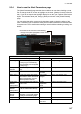
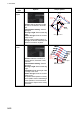
The following fields and boxes can be found in the [Waypoints] page. Scroll the list
rightward to see hidden items.
WPT: Each waypoint has a number.
Name: You can name each waypoint.
Latitude: WPTs latitude coordinate is dis-
played in WGS-84 datum.
Longitude: WPTs longitude coordinate is
displayed in WGS-84 datum.
Leg/°: Bearing of leg
Leg/NM: Length of leg (nm).
Str Mode: Define steering mode for each
leg - rhumb line or great circle. Click to select
[Rhumbline] or [Greatcircle].
RAD/NM: Define turning radius for each
waypoint. To change a radius, put the cursor
in this column to show up and down arrows.
Click the arrows to set the radius.
Ch Limit/m: Define channel limit for each
leg.
Plan SPD: Define planned speed to use with
a leg.
SPD Max: Define maximum speed to use
with a leg.
Margin/m: Define extension for channel lim-
its to be checked against chart alerts.
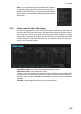
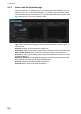
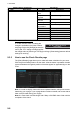
PL 1/m, PL 2/m: One or two sets of parallel
lines, colored orange, can be drawn on a
route. Set the distance (in meters) to offset
the lines from the route, from -99999 to
99999. Parallel lines allow the navigator to
maintain a given distance away from haz-
ards. See the illustration below.
B
WPT2
WPT1
WPT3
Parallel Line for
Leg 1
Parallel Line for
Leg 2