
Operator's Manual
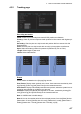

4. HOW TO CONTROL CHART OBJECTS
4-8
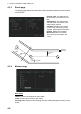
4.3.3 Route page
The [Route] page selects the route parts of the monitored and planned routes to show
on the ECDIS.
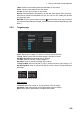
4.3.4 Mariner page
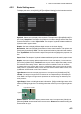
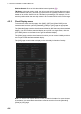
User chart
Labels: Check to show labels on user charts.
Lines: Check to show lines on user charts.
Clearing Lines: Check to show clearing lines (for marking dangerous areas) on user
charts.
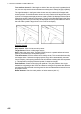
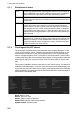
Channel Limit: The distance from
the centerline to one side of the nav
lane.
Safety Margin: The distance from
one side of the channel limit to the
safety margin distance.
Leg Mark: Indications of waypoint
no. and range and bearing to next
waypoint. (True: Reference to North;
Relative: Reference to heading)
Wheel Over Line: The location
where the ship turns toward new
course.
WPT1
124.8°
0.8NM
WPT3
WPT2
87.9°
1.2NM
Channel
limit
Wheel over
line
Leg mark
Safety
margin