
Datasheet



Data Sheet FUJITSU CELSIUS C620 Workstation
Page 5 / 8 www.fujitsu.com/fts/CELSIUS
Fujitsu recommends Windows.
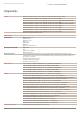
Electrical values
Rated voltage range 100 V - 240 V (AC Input)
Rated frequency range 47 Hz - 63 Hz
Operating voltage range 90 V - 264 V
Operating line frequency range 47 Hz - 63 Hz
Max. output of single power supply 500 W
Power supply output 500 W
Noise for standard conguration (HDD,
ODD)
Dimensions / Weight / Environmental
Dimensions (W x D x H) 431 x 683 x 44.45 mm
Operating position Horizontal
Weight approx. 13 kg
Weight notes Actual weight may vary depending on conguration
Operating ambient temperature 10 - 35 °C
Operating relative humidity 5 - 85 % (relative humidity)
Compliance
Product CELSIUS C620
Model CR1U
Europe CE Class A*
USA/Canada FCC Class A
Global RoHS (Restriction of hazardous substances)
WEEE (Waste electrical and electronic equipment)
Microsoft Operating Systems (HCT / HCL entry / WHQL)
Compliance notes * Warning:
This is a class A product. In a domestic environment this
product may cause radio interference in which case the user
may be required to take adequate measures.
Compliance link http://globalsp.ts.fujitsu.com/sites/certicates
Additional Software
Additional software (preinstalled) Nero Essentials S (burning software)
Fujitsu Recovery (hard disk based recovery)
Norton Internet Security (incl. Firewall) 60 days version
Microsoft Ofce (buy license to activate the pre-installed Microsoft Ofce)
Additional software (optional) Recovery DVD for Windows®
Drivers & Utilities DVD (DUDVD)
CyberLink PowerDVD BD (playback software for Blu-ray Disc™, only with Blu-ray Disc™ drive / Blu-ray playback is not
supported under Windows XP if the system runs on Intel onboard graphics)
Nero 10 Essentials XL (burning/backup/DVD-playback suite)
Security
System and BIOS Security EraseDisk
Boot sector virus protection
Write protect option for the Flash EPROM
Embedded security (TPM 1.2)
Control of all USB interfaces
External USB ports can be disabled separately
Control of external interfaces
User Security User and supervisor BIOS password
Hard disk password
Manageability
Manageability technology DeskUpdate Driver management
PXE 2.1 Boot code
Wake up from S5 (off mode)
Intrusion switch (optional)
iAMT Intel® Active Manageability Technology v8.0 (not activated, not set up)
Manageability software DeskView 10.x client management including: