
User's Manual




Chapter 1 Workflow
> 1.1 When the Multipath Driver is not Used
ETERNUS DX Disk storage systems Server Connection Guide (Fibre Channel) for Linux
12
Copyright 2010 FUJITSU LIMITED
P3AM-3842-05ENZ0
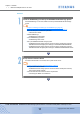
Install the Fibre Channel Card Driver
Install the appropriate driver for the Fibre Channel card being used.
Applicable manual varies according to the server, OS, and Fibre Channel Card type being
used. Select from the following list.
Refer
- "Chapter 7 Installing and Setting Up the Drivers" (page 28)
- Mount cards, install drivers, and perform setup.
• "Driver Settings for PRIMERGY/PRIMEQUEST 1000 Series"
- Mount cards, install drivers, and perform setup.
• "Driver Settings for PRIMEQUEST 500/400 Series"
- Mount cards, install drivers, and perform setup.
• "Driver Settings for Red Hat Enterprise Linux on Other Brand Servers with Emulex
Fibre Channel Cards"
- Mount cards, install drivers, and perform setup.
• "Driver Settings for Red Hat Enterprise Linux on Other Brand Servers with QLogic
Fibre Channel Cards"
- Mount cards, install drivers, and perform setup.
• "Driver Settings for SUSE Linux Enterprise Server on Other Brand Server with
Emulex Fibre Channel Cards"
- Mount cards, install drivers, and perform setup.
• "Driver Settings for SUSE Linux Enterprise Server on Other Brand Servers with
QLogic Fibre Channel Cards"
- Check the Fibre Channel Card driver versions.
• "Server Support Matrix"
Connect the Server to the ETERNUS DX Disk Storage Systems
Connect the server and the ETERNUS DX Disk storage systems using the Fibre Channel
cables.
Refer
- "Chapter 8 Connecting the Server to the ETERNUS DX Disk Storage Systems" (page
29)