
Installation Guide

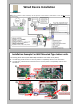



SettingupWireless Device
Beforestarting
AB
Youneedthefollowing:
• IntesisHomeDevice
• Wi‐FiDevice(laptop/smartphone/tablet)
• AccessPointorRouter
• QuickStartGuide/Installmanual
FJ-RC-WIFI-1NA
7FtMax
Getclosetothedevice
OK
CheckWi‐FiSignalstrengthonthe
placementlocation.
• If you don’t have enough Wi-Fi signal:
a. Try to install the IntesisHome device in another place
b. Move the router closer to Wi-Fi module.
• If you have enough Wi-Fi signal then proceed to install.
AB
• Gotoyourdevicenetworksettings.ClickontheINTESISHOMEinsideyournetworkoptions.
2)OpenWebbrowser
Settingup
2
WithyourSmartphone,Tablet
orLaptop,searchfortheWi‐Fi
networkcalled"INTESISHOME"
andconnecttoit.
Onthesamedevice.openaweb
browserofyourchoice.
1)SelectIntesisHomeDevicenetwork
1