
Installation Manual






IntesisHome
®
IS-IR-WIFI-1 User Manual r1.2 eng
© Intesis Software S.L. - All rights reserved
This information is subject to change without notice
IntesisHome
®
is a registered trademark
of Intesis Software SL
URL
Contact
http://www.intesishome.com
http://www.intesishome.com/contact
13 / 23
Using Parrot Mode 4.4.2
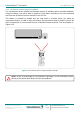
The IntesisHome device includes a special mode (Parrot Mode) that will help you determining if
the desired location is a good option or not. While this mode is active, the device will be sending
constantly one command so you can check if in the desired location the AC system receives
such signal and therefore is a good place to install the device.
In order to activate the Parrot Mode, please do as follows:
1. Power the IntesisHome device and wait for the LED to be green steady.
2. Click fast 3 consecutive times on the IH button.
3. Wait for the LED to start blinking in white.
4. Pick up the IR wireless controller of the AC system and press any function (On/Off
preferably) pointing to the IntesisHome device.
5. Locate the IntesisHome device in the desired location and verify that the AC unit is
receiving the command.
6. Click fast 3 consecutive times on the IH button to disable the Parrot Mode.
IMPORTANT: Parrot Mode is only available if the IntesisHome device is not Wi-Fi configured
yet. If your IntesisHome device is already Wi-Fi configured and you want to use the Parrot
Mode, please reset the device (pressing the IH button for 10 seconds). Remember that
afterwards, you will need to configure the Wi-Fi parameters in the IntesisHome device again.
!