
Installation Guide


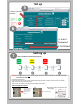


Multi‐ZoneApplication:StepstoRegisterNew(additional)Devices
1)InyourIntesisHomeaccountclickonthesettingsoption
Click
2)ClickonDevices
Click
3)ClickonAddaFacility.Fillallinformationneeded thenClickonthe
plussign
(+)
4)Fillandverifycode.Codeislocatedonthe
deviceorintheproductsbox.Followthesame
procedureifyouhavemorethanonemodulein
yourinstallation.
Click
Click
Multipleindoorunit(includingMulti‐Zone)Applications
• EachindoorunitmusthaveitsownIntesisWi‐Fi
moduletomanageeachzoneindependentlyinone
account.
• Room1
• Room2
• Room3
• Room4
Room2
Room3 Room4
Room1