
User's Manual




MAINTENANCE
6-10 User's Manual
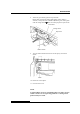
To install the print head:
1. Connect the lower connector to the lower card edge of the print
head.
2. Fit the upper card edge of the print head into the upper
connector.
3. Fit the mounting bosses of the print head into the holes on the
carriage.
4. Connect the fan connector.
NOTE
Be carefully to insert the card edge straightly.
Fan connector
Print head
Bosses of Print head
Lower connector
Lower card edge