
Electronic Accessory User Manual


Table Of Contents
- 1. Getting Started
- 2. Quick Guide to Product Features
- 3. BOOKS Menu
- 3.1 Search Feature
- 3.2 Collins Dictionaries
- 3.3 Diccionario General de la Lengua Español Vox
- 3.4 Merriam-Webster’s Advanced Learner’s English Dictionary
- 3.5 Diccionario Merriam-Webster de Sinónimos y Antónimos en Inglés
- 3.6 Visual Dictionaries
- 3.7 Merriam-Webster’s ALD Supplemental Data
- 3.8 Franklin Thesaurus
- 3.9 Looking Up Inflections
- 3.10 Inflected Form Searching
- 3.11 Misspelling Words
- 3.12 Confusable Words
- 3.13 Uncertain Spellings
- 3.14 Searching for Idioms, Usage Examples and Collocations
- 3.15 Highlighting Words
- 3.16 Adding Words to My Word List
- 3.17 Hints on Inputting Words
- 4. LEARN Menu
- 5. EXERCISES Menu
- 6. TOOLS Menu
- 7. SETTINGS Menu
- 8. General Controls
- 9. PC Connections
- 10. Additional Information
- 11. Warranty Information
49
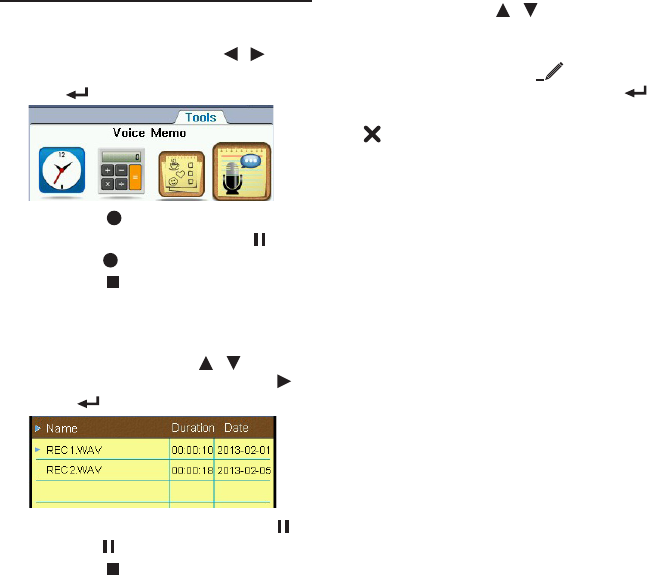
6.4 Voice Memo
Making Recordings
1. In the Tools menu, press / to
select “Voice Memo” and then press
OK / .
2. Press F1 [ ] to start recording.
• Topauserecording,pressF1 [ ].
Press F1 [ ] to resume.
3. Press F2 [ ] when done.
Listening to Recordings
1. In Voice Memo, press / to select
a recording and then press F2 [ ],
OK or .
• Topausetheplayback,pressF1 [ ].
Press F1 [ ] to resume.
2. Press F2 [ ] to stop the playback.
Editing Recordings
In Voice Memo, press / to select a
recording to be edited.
• Tochangethelenameofthe
selected le, press F3 [ ]. Create a
new le name and then press OK / .
• Todeletetheselectedle,pressF4 [
].