
Electronic Accessory User Manual


Table Of Contents
- 1. Getting Started
- 2. Quick Guide to Product Features
- 3. BOOKS Menu
- 3.1 Search Feature
- 3.2 Collins Dictionaries
- 3.3 Diccionario General de la Lengua Español Vox
- 3.4 Merriam-Webster’s Advanced Learner’s English Dictionary
- 3.5 Diccionario Merriam-Webster de Sinónimos y Antónimos en Inglés
- 3.6 Visual Dictionaries
- 3.7 Merriam-Webster’s ALD Supplemental Data
- 3.8 Franklin Thesaurus
- 3.9 Looking Up Inflections
- 3.10 Inflected Form Searching
- 3.11 Misspelling Words
- 3.12 Confusable Words
- 3.13 Uncertain Spellings
- 3.14 Searching for Idioms, Usage Examples and Collocations
- 3.15 Highlighting Words
- 3.16 Adding Words to My Word List
- 3.17 Hints on Inputting Words
- 4. LEARN Menu
- 5. EXERCISES Menu
- 6. TOOLS Menu
- 7. SETTINGS Menu
- 8. General Controls
- 9. PC Connections
- 10. Additional Information
- 11. Warranty Information
4
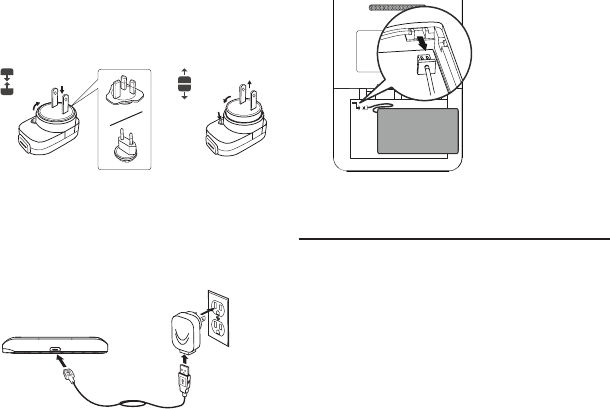
dierent component to the adapter.
Refer to the diagram below to
remove and replace the connector.
1
2
1
2
3
2. Plug the wide end of a USB cable to
the AC adapter and the small end
into the USB port on your device.
3. Insert the AC adapter to a power
outlet.
• Itgenerallytakesafewhoursto
completely recharge the battery.
Removing the Battery
In case you need to remove the battery
for replacement:
1. Open the battery cover on the back
of the unit.
2. Remove the battery by unplugging
from the connector on the device.
1.2 Battery Precautions
Your device is powered by a rechargeable
lithium polymer battery.
• Ifthedeviceisnotusedforalong
period of time, the battery may
lose its charge. Please recharge the
battery following the steps described
above in order to use your device.
• Rechargeablebatteriesareonlytobe
charged under adult supervision.
• Useonlythesuppliedchargersto
recharge the battery. Improperly
charging a battery may damage it or
the device.
• Donotuseanunauthorizedbattery.
Use only the rechargeable battery
that came with your product or that
is listed in the user’s guide.
• Openthedeviceonlytoinsertor
change the battery. All other changes
to this device are strictly prohibited
and will invalidate the warranty.