
Electronic Accessory User Manual


Table Of Contents
- 1. Getting Started
- 2. Quick Guide to Product Features
- 3. BOOKS Menu
- 3.1 Search Feature
- 3.2 Collins Dictionaries
- 3.3 Diccionario General de la Lengua Español Vox
- 3.4 Merriam-Webster’s Advanced Learner’s English Dictionary
- 3.5 Diccionario Merriam-Webster de Sinónimos y Antónimos en Inglés
- 3.6 Visual Dictionaries
- 3.7 Merriam-Webster’s ALD Supplemental Data
- 3.8 Franklin Thesaurus
- 3.9 Looking Up Inflections
- 3.10 Inflected Form Searching
- 3.11 Misspelling Words
- 3.12 Confusable Words
- 3.13 Uncertain Spellings
- 3.14 Searching for Idioms, Usage Examples and Collocations
- 3.15 Highlighting Words
- 3.16 Adding Words to My Word List
- 3.17 Hints on Inputting Words
- 4. LEARN Menu
- 5. EXERCISES Menu
- 6. TOOLS Menu
- 7. SETTINGS Menu
- 8. General Controls
- 9. PC Connections
- 10. Additional Information
- 11. Warranty Information
47
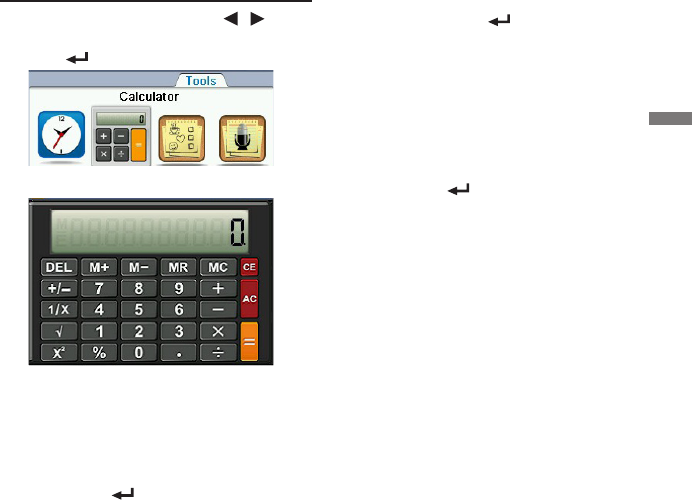
6.2 Calculator
1. In the Tools menu, press / to
select “Calculator” and then press
OK / .
2. Type a number.
• Youcantypeupto10digits.Totypea
decimal, press L(.). To change the sign
of a number, press C(+/-).
3. Press a math function key.
4. Type another number.
5. Press OK / for the result.
6. Press ?*(AC) to start over again at
0.
Using the Calculator Memory
To demonstrate the calculator memory,
try the following equation: (32 x 12) – (8
x 8) = 320.
1. Type 32, press J(x), type 12, and
then press OK / .
2. If necessary, press M(MC) to clear
the calculator memory.
3. Press V(M+) to add the result to the
memory.
• M indicates a number is stored in
memory.
4. Type 8, press J(x), type 8, and then
press OK / .
5. Press B(M-) to subtract the result
from the number stored in the
memory.
6. Press N(MR) to retrieve the new
number from memory: 320.
6. TOOLS Menu